pngtoicotool
Browser-only conversion

ICO → WebP

ICO to WebP Converter

Choose an image layer inside your ICO and download that layer as WebP. The file stays on your device.

Nothing leaves your device

Drop an ICO here

or

ICO · one file · one WebP image per download

Choose one decoded layer. The largest decoded layer is selected by default when the file contains multiple layers.

Local processing. Your ICO is never uploaded.

Choose a frameSee its decoded pixel size before exporting
Verify formatDownload only when the browser makes real WebP bytes
Local conversionYour ICO stays in this browser

Recorded walkthrough

See a real ICO layer become a WebP file

The browser demo opens a four-layer ICO, selects its 32 × 32 layer, downloads a WebP, and checks the saved file. The recording was made in a desktop Chromium browser; a physical phone and other browsers were not tested.

Before you download

Know which image inside the ICO becomes WebP

An ICO may hold more than one image. The selector shows each layer this browser decoded, with its actual width, height, and directory position. The largest decoded image is selected first; change it if your destination needs a smaller image.

  • The menu describes decoded frames, not every directory entry in a damaged or unsupported ICO.
  • The preview and filename reflect the selected frame, not the overall ICO file size.
  • Only one WebP is exported per click. Select another frame to make another file.
  • If this browser substitutes PNG for WebP, the tool stops without downloading a mislabeled file.

Inspect the result

Check the file you actually received

The output name includes the selected image's dimensions, such as icon-32x32.webp. Open the downloaded file to check the edges and any transparent background at its intended display size. The filename is a clue; the image itself is the final check.

  1. 01
    Load the ICO

    Check the decoded-layer count in the status line. A file can be valid yet contain a frame this decoder does not support.

  2. 02
    Choose deliberately

    Compare the displayed dimensions before exporting. This page does not upscale a small frame to a larger one.

  3. 03
    Open the download

    Confirm the file opens as WebP and its appearance suits your destination. Select a different layer and repeat if needed.
Format boundary

What changes in an ICO to WebP conversion?

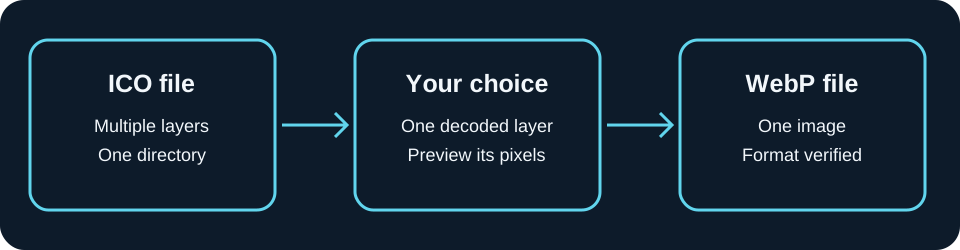
The ICO directory can point to multiple embedded images. This tool decodes the layer you select into a canvas, then asks the browser to encode that canvas as WebP. The download is a single image, so other ICO layers are not carried into it. WebP can represent transparency, but inspect the downloaded result when transparent edges matter.

Browser encoders may fall back to PNG when a requested image format is unsupported. Before download, this tool checks the returned MIME type and the WebP file signature. If either check fails, it reports the limitation instead of renaming PNG data to .webp.

References: Canvas image export and format fallback; WebP format and transparency.

ICO with multiple embedded images, one selected decoded layer, and one verified WebP download
Only the selected ICO layer goes into the WebP download.

FAQ

ICO to WebP questions

How do I convert ICO to WebP?

Choose an ICO, select one decoded layer, and click Export selected layer as WebP. The WebP is created in this browser.

Can I choose which ICO size becomes WebP?

Yes. When the ICO contains multiple decoded layers, choose the layer from the size list before exporting.

Does one WebP contain every ICO layer?

No. WebP export here uses the selected image only. To keep several sizes, export each desired layer separately.

What happens if a layer cannot be decoded?

The page keeps the layers it can decode and lists those layers for export. If no layer can be decoded, it shows an error instead of creating a blank file.

What if WebP export is unavailable in this browser?

The page shows an error and does not download a file. Try a browser with canvas WebP encoding, or export a PNG from the linked ICO to PNG tool.

Does the converter upload my ICO?

No. The ICO is read and converted in your browser and is not sent to a server.